
Generative AI in Qmarkets
Qmarkets empowers organizations with advanced Generative AI capabilities designed to accelerate innovation processes, improve decision-making, increase user engagement, and automate manual work across the platform.
The AI capabilities within Qmarkets help organizations:
Generate insights and summaries faster
Automate evaluations, categorization, and analysis
Improve content quality and consistency
Enrich innovation workflows with internal and external intelligence
Reduce manual effort throughout the innovation lifecycle
These capabilities are integrated directly into the Qmarkets platform and can support ideation, evaluation, scouting, continuous improvement, project analysis, campaign management, and knowledge sharing processes.
Security, Privacy, and Data Protection
Qmarkets follows strict security, privacy, and confidentiality standards when integrating Generative AI technologies.
Key principles include:
Customer data is not used to train AI or LLM models
Customer data is not reused across customers
Data is not permanently stored by Qmarkets as part of AI generation flows
Communications with AI providers are encrypted in transit and at rest
Enterprise/API AI services are used, designed for business and enterprise environments
AI functionality can be configured and controlled by administrators
Depending on the configured AI vendor and architecture, additional controls may include:
Bring Your Own Key (BYOK)
Vendor-specific data residency controls
Web search enablement controls
File processing and retention controls
For additional information, refer to:
Generative AI Settings
Connecting your Own AI Service (Bring Your Own Key)
Getting Started
To activate AI capabilities in your system, please contact your Account Manager or Customer Success Manager.
Once enabled, administrators can configure:
AI providers and API settings
Available AI modules
System-level AI context
Web search permissions
AI-powered workflow behaviors
Prompt configurations and reference fields
Learn more by reading the relevant articles or watching the tutorials below.
Intro and General Settings
Configure the foundational AI settings for your system, including:
AI provider configuration
API connectivity
System-wide AI context
Innovation methodologies
AI module activation
Security and governance settings
Read this article or watch this tutorial.
AI-Powered Fields
AI-Powered Fields automatically generate insights, classifications, scores, summaries, and recommendations throughout the innovation workflow.
These fields can:
Categorize ideas automatically
Generate executive summaries
Assess risks, impact, feasibility, or value
Select predefined categories or priorities
Generate numeric evaluations or textual analysis
Enrich decisions using additional reference fields and optional web search
Supported field types include:
Text
Number
Selection fields (Select, Radio, Checkbox)
AI-generated fields can be triggered automatically during workflow transitions or regenerated manually by authorized users.
Typical use cases:
Executive summaries
Strategic alignment analysis
Risk and impact scoring
SWOT analysis
Department or business unit classification
Idea prioritization
Market or trend validation
Read this article to learn more.
AI Assistant
The AI Assistant helps users create, improve, and optimize textual content directly within Qmarkets.
The assistant can:
Generate new content
Rephrase existing text
Simplify or elaborate descriptions
Improve grammar and wording
Create more concise and professional communication
The AI Assistant is available across multiple areas of the platform, including:
Ideas and submissions
Challenges and campaigns
Reviews and evaluations
Comments and expert feedback
Emails and notifications
News and communication content
The assistant helps improve both efficiency and content quality while maintaining contextual relevance based on the surrounding innovation workflow.
Watch this tutorial to learn more.
AI Image Generator
The AI Image Generator allows users to create or enhance images directly within Qmarkets.
Supported use cases include:
Idea illustrations
Campaign visuals
News images
Innovation-themed graphics
Image enhancement and regeneration
Users can:
Generate entirely new images from prompts
Modify existing uploaded images
Refine image outputs with additional instructions
Create multiple visual variations
The image generation process is integrated directly into the platform workflow and supports both generation and regeneration scenarios.
Watch this tutorial to learn more.
AI Insights from videos,files or any other uploaded content
Qmarkets Generative AI enables automatic insight generation based on files and media uploaded across the platform, including ideas, campaigns and additional entities.
These features provide AI insights on files from various types: PDF, Word, PPT, Excel, Audio, Video and more.
You can benefit from it by being able to:
- Reading a concise summary instead of reviewing long documents
- Understanding video content without watching the full recording
- Generating transcript-based insights from uploaded media
- Using extracted information as additional context for other AI-Powered Fields. For example:
An Executive Summary field can be generated based not only on submission fields, but also on information extracted from uploaded documents, presentations, images, videos, and transcripts.
How does it work:
- AI insights are generated automatically after the file is saved
- Users can view the generated summary per file in both supported display types
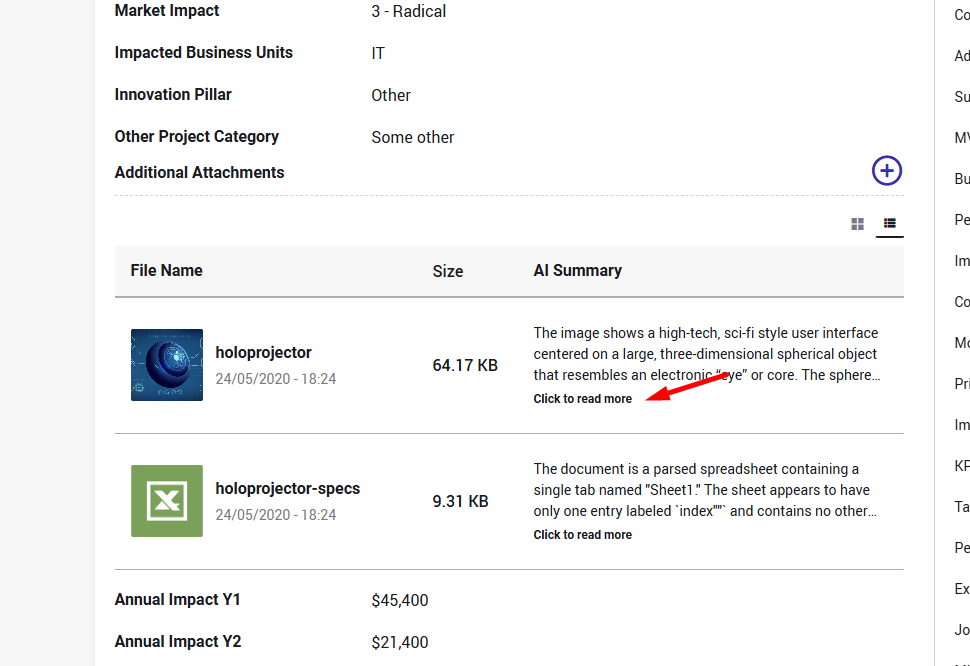
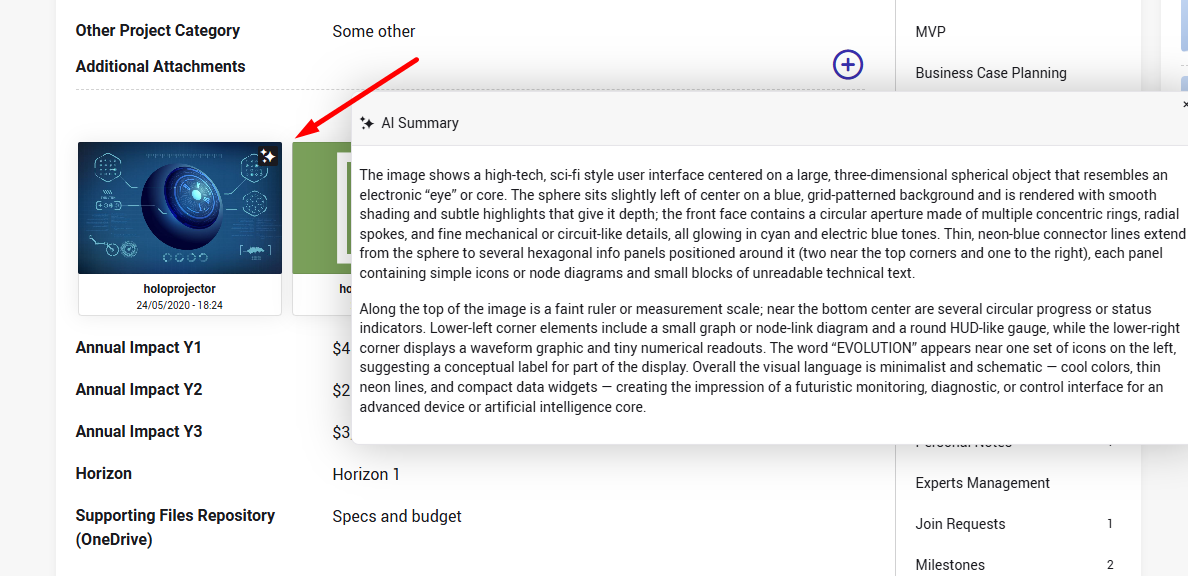
- Insights can also be generated or regenerated manually when needed by authorizes users
To learn more re the setting, please click here
AI Web Search
Qmarkets optionally supports AI-powered real-time web search capabilities.
When enabled, the AI can retrieve external information before generating responses, helping enrich:
Market analysis
Competitor research
Trend identification
Technology scouting
External validation and benchmarking
Web search capabilities are controlled by administrators and can be enabled per AI-powered field.
Read this article to learn how AI Web Search works and how to enable it.
Prompt Design and Best Practices
The quality of AI-generated outputs depends heavily on prompt quality and contextual relevance.
Recommended best practices include:
Keep prompts focused and explicit
Clearly define the task and expected output
Reference specific fields when relevant
Avoid overly broad or ambiguous instructions
Define fallback behavior for missing information
Specify formatting expectations when needed
Example structure:
Act as a strategic innovation analyst.
Using the following fields: - Problem Statement - Expected Benefits - Timeline
Assess the implementation feasibility of this idea.
Rules: - Use only the provided data - Do not assume missing information - Return a concise professional summary under 150 words
For additional guidance:
Suggested AI Prompts
Recommended Prompt Structure
Monitoring and Transparency
Qmarkets includes AI audit and monitoring capabilities that allow administrators to review:
Prompt requests
AI responses
Token usage
Web search activity
Errors and completion statuses
These logs help organizations:
Improve prompt quality
Troubleshoot issues
Monitor AI usage
Maintain governance and transparency
Related Articles
AI-Powered Fields Settings – Why & How to Use Them
AI Web Search – How It Works and How to Enable
AI Logs for Sysadmins - Why & Where to View Them