
Customers are sometimes reluctant from adding new setting since they do not want that the new setting they would automatically impact all existing campaigns, without taking into consideration if the new setting is relevant to all campaigns and/or should be first communicated to the campaign managers.
The main benefit is to increase adoption among innovation catalysts and campaign managers, helping campaigns succeed and generate greater impact.
Campaign managers’ preferences and needs can now be fully supported without necessarily affecting other campaigns.
For example, multiple notifications can now use the same trigger, allowing each campaign manager to select the notification that best suits their campaign.
When updating subsystem settings, it's important to understand how these changes affect existing campaigns.
While some changes are applied immediately across all campaigns, others depend on the campaign's current configuration and status.
1. Submission Fields
When adding new submission fields to the subsystem template, the changes will only be applied to existing campaigns that meet both of the following conditions:
The campaign does not contain any submitted ideas.
The campaign's submission form has not been customized and still matches the subsystem template.
If either condition is not met, the new fields will not be automatically added to that campaign.
This ensures that existing submissions and customized submission forms remain unaffected.
Learn more here about the submission form setting
2. Workflow Settings – States, Notifications, and Workflow Fields
When adding new workflow states, notifications, or workflow fields, you can determine whether these changes should also apply to existing campaigns.
The relevant option is available when adding a new setting, allowing you to control whether it should be added to existing campaigns, new campaigns, or both.
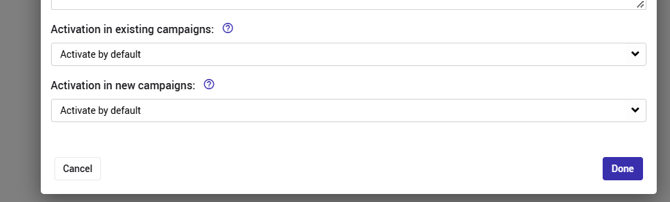
When editing an existing setting, only the second option is available.
Learn more here about the workflow setting and notification settings.
3. Other Subsystem Settings
Changes to other subsystem settings are applied immediately to existing campaigns.
Unlike submission fields and the workflow settings mentioned above, these changes do not require additional configuration to take effect.