
The auto assignment feature is the most efficient way to assign users to roles based on a pre-defined logic.
Once the assignment methods or/and assigned user have changed, the relevant change should impact automatically all relevant entities (ideas/projects/etc.).
There are several reasons why sysadmins may mistakenly think that the users' reassignment does not work.
1. The assignment of the users it is not an ad-hoc process. It is done via an hourly background process
The process starts within about 1 hour after changes are made, but completion may take longer (up to a few hours) depending on:
- The number of entities that need to be re-assigned
- Other background processes running at the same time
This is why notifying that a specific entity is not updated, doesn't mean necessarily that the process is not running.
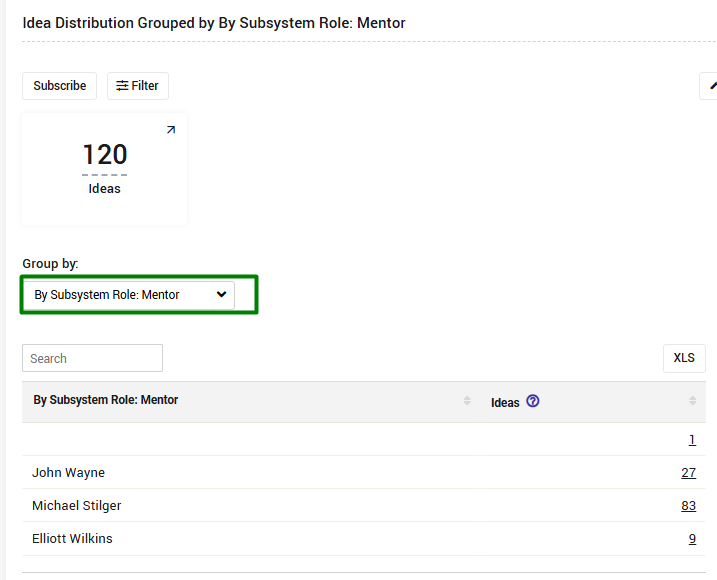
To verify the process is running, and more users assigned has time passes, you can create a custom report showing the # of entities assigned to any relevant role.
To learn how to create a new report, please review this short video.
For example:
Such report will show how many ideas are assigned for each mentor (plus how many are still not assigned):
2. Manual Assignment was performed in the past
Once a user is assigned manually to a specific idea/entity in the past, the auto assignment rules will NOT apply any more for this role on this idea/entity.
The reason here, the system assume manual assignment was done for a reason.
A manual assignment can be tracked in the revisions.

To correct that, you will need to re-assign users manually on this/these entities as explained here.
In case that there is a need reset past manual assignments OR there are too many assignments that needs to be corrected, please contact your CSM.
3. Idea is closed/archived
Once an idea is closed/archived/duplicated, automatic reassignment will not run on it.
Reason is that the system assumes that the "task" that the role was supposed to do was already completed/not relevant anymore.