
What You Can Use It For
AI Web Search is ideal wherever up-to-date external data drives better decisions. Typical use cases include:
Market Research
Current market size estimates
Recent industry trends
New technologies, solutions, and vendors
Emerging risks or regulatory updates
Competitor & Benchmark Analysis
Competitor product launches
Funding rounds, acquisitions, leadership changes
Pricing models (publicly available)
Strengths, weaknesses, positioning
Technology Scouting
Latest startups in a specific domain
Real examples of use cases and implementations
Recent patents or research (public domain)
Financial & Business Insights
Investment trends
Customer adoption metrics (public analytics)
Regional market performance
General Validation
Verifying claims from an idea description
Checking feasibility, availability, or maturity
Gathering external support for a business case
If your use case depends on real-world facts or the very latest developments, AI Web Search is the right tool.
How It Works
When AI Web Search is enabled for an AI-powered field, the model is allowed to perform a web search in real time to gather relevant supporting information.
It then uses those findings to generate a more accurate and up-to-date response for your field.
Behind the scenes (high level):
The field’s normal AI prompt is sent
Because web search is enabled, the model may fetch online sources
The model uses these sources to produce its output
Source links are logged internally (for auditing), but removed from the final field value
All other behavior and workflows remain exactly the same: AI responses are still generated on state change, regenerate, or edit-save.
How to Enable AI Web Search
Qmarkets representative will activate web search on the system level. Once active, you can enable it per AI-Powered field.
Enable for a Specific AI-Powered Field
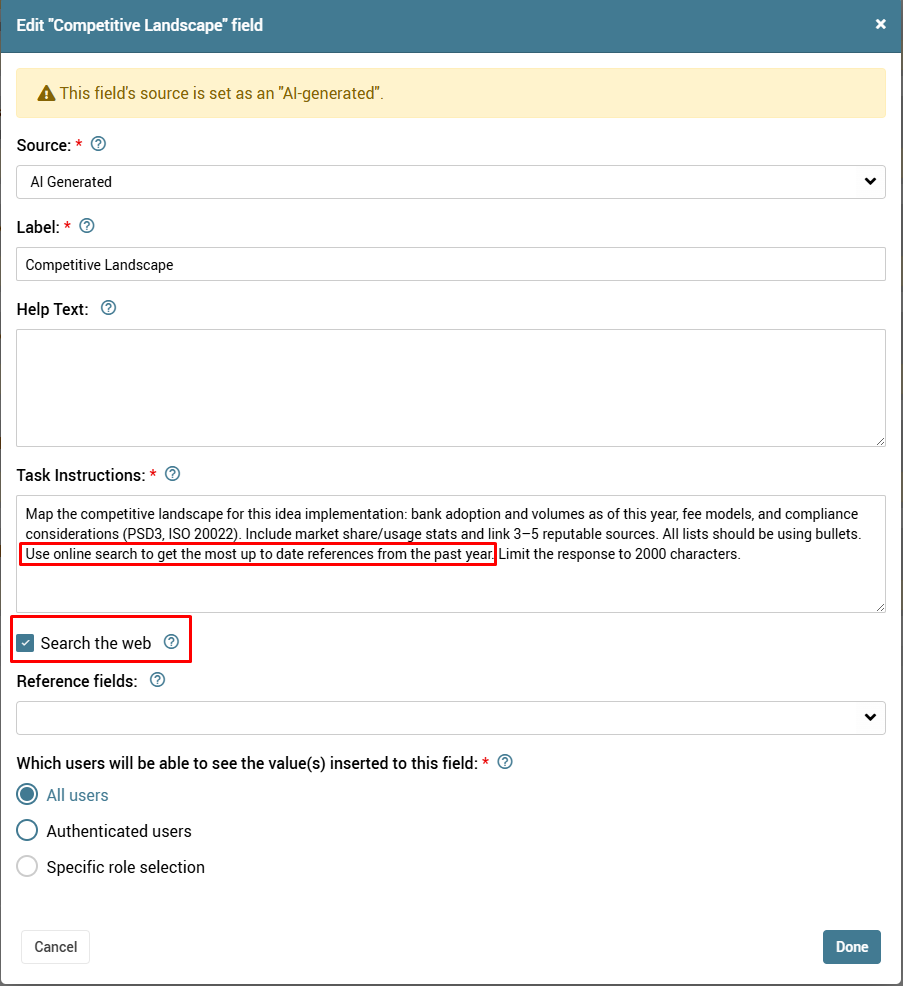
Edit the workflow field you want to enhance
Under Task Instructions, enable Search the web
Save the field
That’s it. The next time the workflow reaches that field’s state, the model can search online to improve its output.
What You Should Know
It does not access private or internal systems. Only public web results are used.
Search behavior is automatic. The model decides when a search is needed based on your task instructions.
Citations are shown. Links returned by the model are recorded in your AI Data Log and shown to users in the field.
Timeout is extended. Web search responses may take up to 90 seconds.
All existing security restrictions still apply. Nothing changes in your permission structure.
Tips for Best Results
To get the most accurate output:
Write task instructions that encourage fact-finding
Examples:
“Use the latest available market data”
“Reference current competitors in this domain”
“Identify recently launched technologies related to this idea”
Use web search only where it matters
For creative or internal tasks (summaries, elaborations, drafting text), web search isn’t necessary.
Keep requests focused
A specific, narrow instruction will produce more relevant search results.
Recommended Scenarios Inside Qmarkets
Q-Scout
Screening new startups
Evaluating technology maturity
Finding real examples of competitors or customer references
Q-Ideate
Validating innovation opportunities
Collecting market drivers for ideas
Adding trend or technology context
Q-Optimize (Improvements)
Finding benchmarks for process KPIs
Cost ranges, typical improvement outcomes
Industry performance comparisons
Q-Impact / Portfolio
Market maturity checks
Competitive landscape validation
Risk indicators from external sources
When Not To Use Web Search
Internal processes or proprietary data
Tasks that depend only on idea content
Large multi-field automation (to avoid long runtime)
Highly confidential workflows where external data is irrelevant