
AI-Powered Fields
AI-Powered Fields enable automatic AI-based generation of insights, classifications, summaries, evaluations, and other supporting content throughout the innovation lifecycle. These capabilities help organizations reduce manual effort, improve consistency, and accelerate idea analysis and decision-making.
The AI can generate outputs automatically during workflow transitions, on submission, or manually through regeneration actions, depending on the field configuration. Supported AI-generated field types include:
Text
Number
Selection fields (Select, Radio, Checkbox)
The AI can also use additional idea fields, campaign context, and optional web search capabilities to improve result quality.
Common Use Cases
Executive Summaries
Automatically generate concise summaries for long or complex submissions.
Recommended when:
Idea descriptions are lengthy
Campaigns are broad or cross-functional
Large volumes of submissions require rapid triage
Example:
Generate a short executive summary highlighting the core problem, proposed solution, expected impact, and implementation complexity.
Idea Value Assessment
Use AI to evaluate the potential value of an idea before it progresses through the workflow.
The output can be:
Textual assessment
Numeric score
Automatic selection from predefined categories
Example:
Estimate the expected business value and strategic alignment of the idea.
Risk, Feasibility, and Impact Assessments
Generate structured evaluations to support review committees and decision makers.
Examples:
Risk analysis
SWOT summaries
Feasibility scoring
Strategic alignment classification
Expected cost vs. benefit evaluation
These insights can be triggered at different workflow stages. For example:
Executive Summary on idea submission
SWOT Analysis during advanced evaluation
Strategic Fit assessment before approval
How to Configure an AI-Powered Field
Navigate to the relevant Workflow State settings.
Open the "Additional Info Fields" page.
Add a new field.
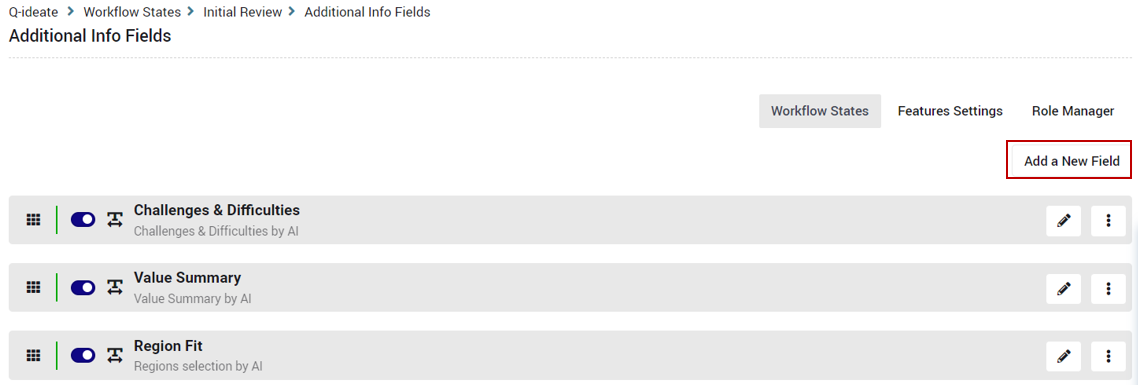
Select one of the supported field types:
Text
Number
Select / Radio / Checkbox
Set the field source to AI Generated
Configure the AI settings and task instructions.
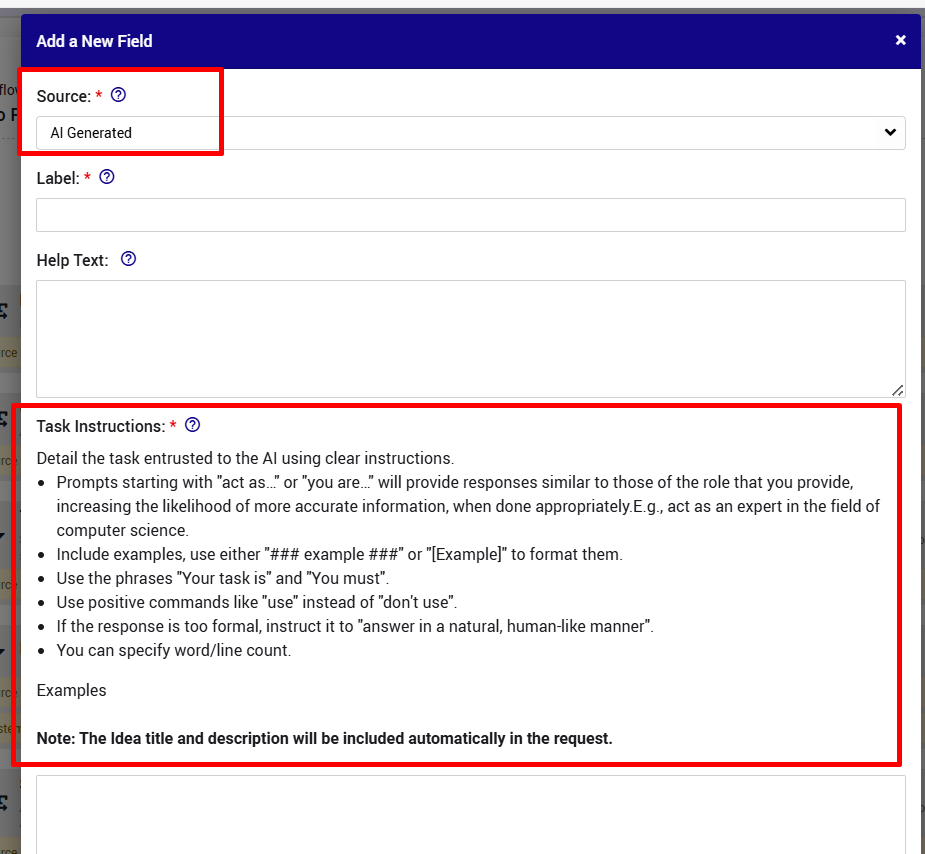
Supported field references and prompt enrichment capabilities are described in the AI-Powered Fields specifications.
Understanding How AI Prompts Work
The AI request is assembled into a structured prompt that includes:
General company and subsystem context
Campaign information (optional)
Idea title and description
The configured AI task instructions
Additional reference fields (optional)
Output formatting instructions
Language and validation rules
The system automatically enriches the prompt with relevant context, so there is usually no need to manually repeat information already available in the idea or campaign.
How Field Data Is Sent to the AI
When additional fields are selected as reference fields, their data is sent as structured text within the prompt.
Each referenced field includes:
Field title (label)
Field value
Field machine name / unique identifier
Field types are normalized before being sent:
| Field Type | Sent Format |
|---|---|
| Text | Plain text |
| Number | Includes numeric format and units/prefix/suffix |
| Selection | Includes available values and internal term IDs |
This allows the AI to understand both the semantic meaning of the field and the technical structure required for deterministic outputs.
Referencing Fields Inside Prompts
Reference fields are additional context which can be relevant for the AI to complete its task.
You can and should reference fields by their titles directly in your instructions.
Example:
Analyze the "Scope" and "Timeline" fields to assess implementation feasibility.
This works because:
Field titles are explicitly included in the prompt
The AI receives labeled structured inputs
Internal machine names are included for deterministic mapping
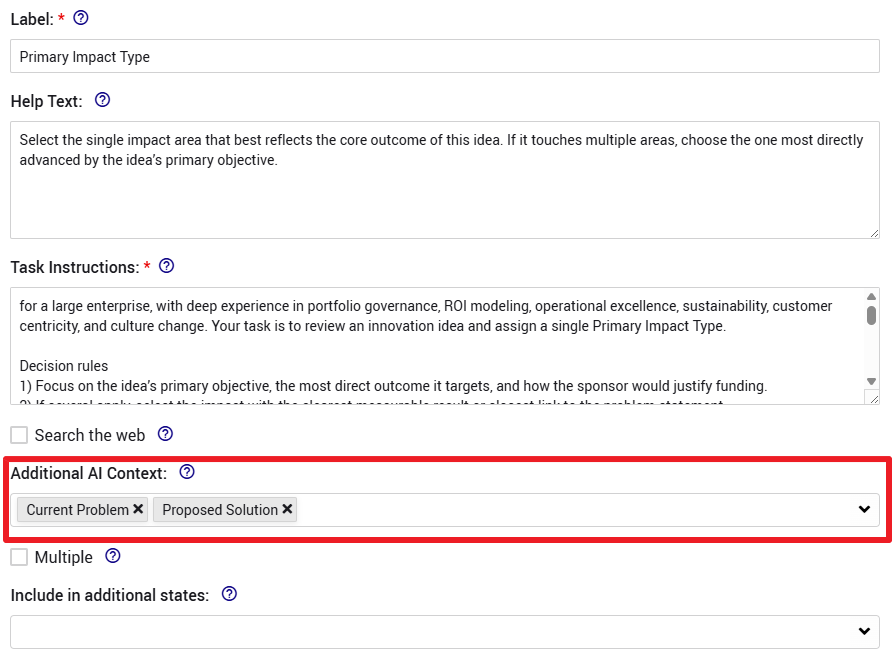
Empty Fields Behavior
If a referenced field has no value:
The field is still included in the prompt with an empty value
The AI is expected not to invent missing information
If insufficient data exists, the field may remain empty
A data-related error message may be displayed
This behavior helps prevent hallucinations and unsupported conclusions.
Web Search Option
Administrators can optionally allow AI-generated fields to perform real-time web searches before generating responses.
This is useful for:
Market analysis
Competitive intelligence
Trend discovery
External validation
If enabled:
The AI may retrieve up-to-date external information
Citations are logged internally
Output formatting rules are still enforced
If you do not see the Web Search option, contact your Customer Success Manager.
Prompt Writing Guide
Well-structured prompts produce significantly more accurate and consistent outputs.
General Principles
Be Explicit
Clearly define:
What the AI should analyze
Which fields should be used
What type of result is expected
Avoid:
Analyze the idea
Prefer:
Analyze the "Problem Statement", "Timeline", and "Expected Savings" fields to assess feasibility and business impact.
Keep Each Field Focused
Each AI field should perform one specific task.
Good examples:
Generate an executive summary
Estimate implementation complexity
Classify strategic alignment
Identify key risks
Avoid combining multiple unrelated tasks into a single field.
Define Output Expectations
Specify:
Desired format
Length constraints
Allowed values
Fallback behavior
Example:
Return only one category from the provided list.
If insufficient information exists, return "None".
Prevent Unsupported Assumptions
Instruct the AI to rely only on provided information.
Recommended rule:
Do not assume missing information.
Recommended Prompt Structure
A reliable prompt structure is:
Role (optional)
Fields to analyze
Task instruction
Rules and constraints
Output format
Example:
Act as a product evaluation analyst.
Using the following fields: - Scope - Timeline - Expected Savings
Assess the implementation feasibility of this idea.
Rules: - Use only the provided field data - Do not assume missing information - If insufficient data exists, return "Insufficient Information" - Return a concise professional summary under 150 words
Best Practices
Use Reference Fields Strategically
Include only fields that materially improve the task quality.
Too many unrelated fields may:
Increase token usage
Reduce output precision
Introduce conflicting context
Use Field Titles Naturally
Field labels act as semantic anchors for the AI.
Example:
Compare the "Current Process" field against the "Proposed Solution" field.
Keep Instructions Deterministic for Selection Fields
For AI-generated selection fields:
Explicitly state whether multiple values are allowed
Define fallback behavior
Request exact matching values only
Example:
Select exactly one category from the provided terms.
If no clear match exists, return an empty response.
Selection field behavior and term handling are defined in the AI selection field specifications.
Define Numeric Expectations for Number Fields
For number outputs:
Clarify whether the value should be integer or decimal
Define the scoring scale or units
Example:
Return an integer score between 1 and 10 representing implementation complexity.
Avoid Overly Broad Instructions
Broad prompts tend to generate inconsistent results.
Avoid:
Analyze this idea completely.
Prefer:
Evaluate the expected operational impact and summarize the primary benefit in two sentences.
Monitoring and Troubleshooting
All AI requests and responses are logged internally.
Administrators can review:
Full prompts
Responses
Tokens usage
Web search activity
Errors and finish reasons
Navigate to:
Admin → System Logs → AI Audit Logs
This is useful for:
Prompt optimization
Troubleshooting failed generations
Reviewing AI behavior
Improving consistency
AI logging and audit capabilities are described in the platform specifications.
Important Notes
AI-generated results may occasionally contain inaccuracies.
Prompt quality directly impacts output quality.
AI-generated fields remain editable by authorized users.
Empty or insufficient input may result in no generated output.
Generated fields display an AI indicator on the idea page.
Continue refining prompts over time based on observed results and audit log feedback.
Note: AI Insights generation runs in the background and does not prevent users from reviewing existing information on the idea or continuing to work on other ideas while the insights are being generated.