
Points can be awarded to the Author/Co-Author(s)/Stakeholders when their idea, or other entity, transitions through the workflow states.
Best practice tips
- We recommend awarding points for idea submission at a minimum. This rewards initial user participation.
We also recommend giving points for reaching milestone states such as Approved, Selected and/or implemented to reward successful ideas' authors. - To help encourage teamwork, you should also award points to co-authors.
- Feel that you want to reward users for their participation beyond collaboration?
Points can also be allocated to the stake holders for acknowledging their contribution by processing the entities along the workflow, as described in this article.
These are the steps you need to take in order to define when and how many points the author/co-authors will get, and how many other stakeholders will get.
1. From within the Subsystem Settings, select the Workflow wizard.

2. Click the pencil icon for the relevant state.

3. In the 'Edit State' window, you can define different points for any stakeholder role to acknowledge their contribution to the progress of the ideas, projects, or other entities they are associated with.
You can of course add multiple lines and define different number of points for the different roles.
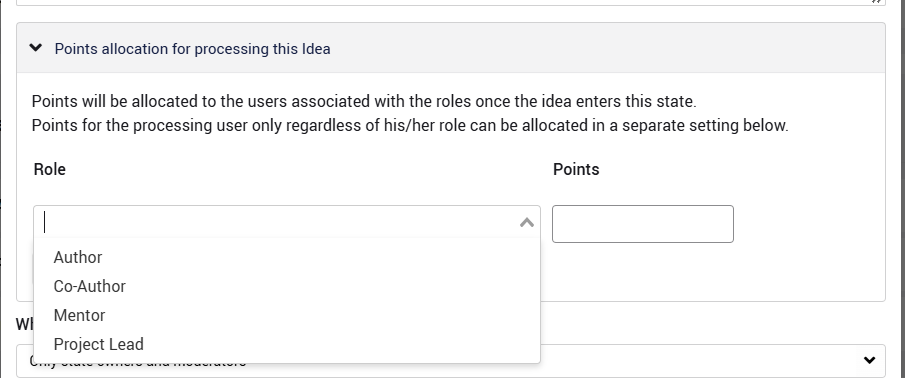
When you select a specific role, users assigned to this role will get the points regardless of if they actually processed the idea/project or not. It can be for example that the transition was triggered by an automated role, but the user still needs to be acknowledged.
There is an option to give points for the single user that actually the idea, as explained here.
For other point configuration options, please refer to the following page: Gamification Point - how to configure, manage and monitor