
In today's digital landscape, ensuring clarity and ease of use for users is paramount for the success of any system.
This article delves into key strategies to make the system more transparent and user-friendly.
1. Make Sure it's 100% clear what you are looking for...
A good idea is an idea that answers what you are looking for…
- Describe the purpose and expectations
Make sure the campaign title, question and additional information are clear and informative. Keep them short, to the point, and aligned with your goals. The challenge that needs solving should be easy to understand at first glance - Load relevant supporting documentation to ensure users have everything they need to start participating
- If you see that un-wanted ideas are being submitted, you can do the following:
- Considering moving the to the most relevant campaign and comment on idea that it was moved so everyone can learn from it
- Refine the campaign description to include also what type of ideas AREN'T relevant so people will discontinue submitting this type of ideas
Watch this tutorial for more guidelines
2. Task-Specific Guidelines:
Guidelines for State Owners
It's essential to go beyond the default "Process Idea" and add state-specific guidelines via the state general settings. This customization ensures that tasks are 100% clear for the user that needs to perform them, depending on where are we in the process, who is the typical user and what is required in order to complete the task.
To do that, navigate to the desired state in the workflow, and then click on the edit icon:

You can make the relevant changes under the 'Moderation task description' field:

This is how it will be displayed for the user who needs to complete a task: 
If needed, the inserted text can be translated to any of the system languages via the subsystem translation page.
If needed, the "Complete Task" button can also be renames as explained here.
Guidelines for comment submitters
Exposing additions /Guidelines Ines on every comment submission.
It will be displayed as a tool tip on the post comment button.
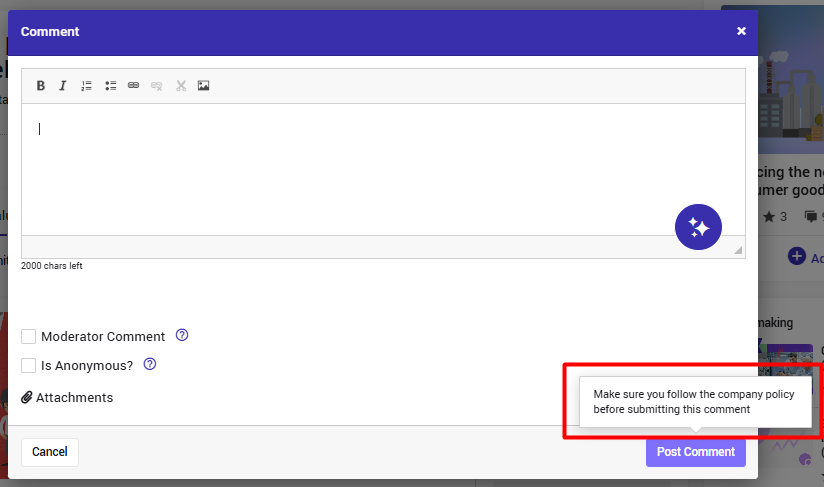
Configuring this text is done via the SS setting-->Workflow-->Features-->Comments
3. Accurate State Descriptions
Adding accurate and meaningful state descriptions (or leaving them empty if not needed) via the state general settings is crucial. Clear descriptions help users understand the purpose and context of each state within the workflow.
 The state description will be disabled as you can see below and help users understand the current state of the idea in the process and its significance:

The State help text will also be visible to the campaign creator when deciding whether to disable specific states in particular campaigns:

4. Define Automatic Due Dates
Set reasonable automatic due dates per task using the system default settings. This feature helps users stay on track and ensures timely completion of tasks.
The due date will be displayed on. various places, including on the idea itself:

Watch this tutorialto learn how to do it.
5. Add Clear Guidelines to your forms:
- Add Help Texts for Fields
Avoid long labels that can be confusing and provide concise guidance to users.
Alternatively, add help texts to the fields - both on the submission form and along the workflow.
- Use of Static Fields with Formatting
If relevant, incorporate static fields with formatting to improve data presentation and user experience.
Click here to learn more about this option.
This is how it can look: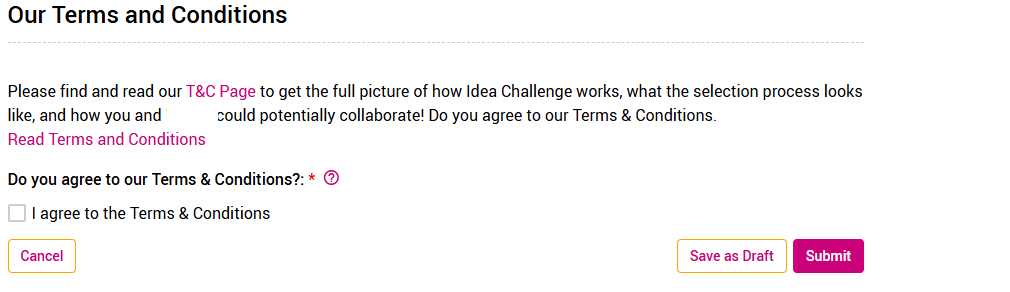
6. Clear Emails and Notifications for State Owners
Implement clear notifications for state owners, including variables like due dates and categories.
Make sure email and notification are translated to all relevant languages.
Watch this tutorial to learn how to do that.
For further assistance, please collaborate with your CSM.
7. Enable AI
System stakeholder can use AI for enhanced and improving guidelines across the system, notifications etc.
End users can use the AI assistant for better describe their ideas and comemtns.
By implementing these strategies, organizations can enhance user clarity, streamline workflows, and create a more intuitive and efficient system experience for all stakeholders.